Active Surveying Beyond the Catalog Perimeter | Part 4
Why a tool built on careful surveys also needs a chat panel, and what we do to keep the answers honest.
In Part 3 we followed a question from the moment someone asks it to the moment its answer is published, and we ended with a promise: that deep analysis would stop producing static reports and start contributing to a conversation about a resource. Egeria is the open-source metadata and governance platform Resource Explorer is built on; it is where anything worth keeping ends up.
A note on these blogs. We’re building Resource Explorer as we write this series, so the measurements and limits described here were true when we wrote them, and we expect many of them to be out of date quickly. That’s deliberate. We want to be honest about the gaps we find, because finding an issue is the first step toward fixing it. So read this as a view from the inside: what we think is good, as well as where we know it falls short. Progress marches on.
Why Chat, When We Already Have Surveys
Open Resource Explorer and the first thing most people ask is why there is a chat panel at all. We have spent three posts on surveys that measure a resource carefully. If chat can answer questions, why bother with surveys? And if surveys answer them, why chat?
It helps to separate two kinds of work that are easy to run together. Defining a survey is planned work. Someone decides which questions matter, which analyses answer them and in what order they run, and captures that as a reusable survey definition. That is often done by a different person at a different time, sometimes as part of a configuration project, and the people who later use Resource Explorer may have had nothing to do with it.
Running surveys is a different activity. You choose from a menu of available surveys and decide which to run, against which resources, and in what order. Each one produces a defined answer in a defined shape, stored with a record of how it was produced.
That works well for the questions someone anticipated. But what if you have a follow-up question, want a better explanation of a result, or have a question nobody defined in advance? That is what chat is for. We don’t see surveys and chat as competing ways to learn about a resource; they do different jobs, and we need both.
Surveys Measure, Chat Asks
Surveys and their analytics answer the questions that were planned for. Most of our analyses are ordinary code: they parse code, read database catalogs, walk file systems and record what they find. Some are not. An analysis that classifies text or matches a column to a glossary term may use a model, and an analysis you add yourself can use whatever it needs. Those results are less repeatable, so a result has to say how it was produced as well as what it found. Each result is stored with its state: there is a result, the analysis ran and found nothing, it has never been run, or it failed. “We checked and found no CVEs” and “we never checked” are very different statements, and a report that blurs them is worse than no report.
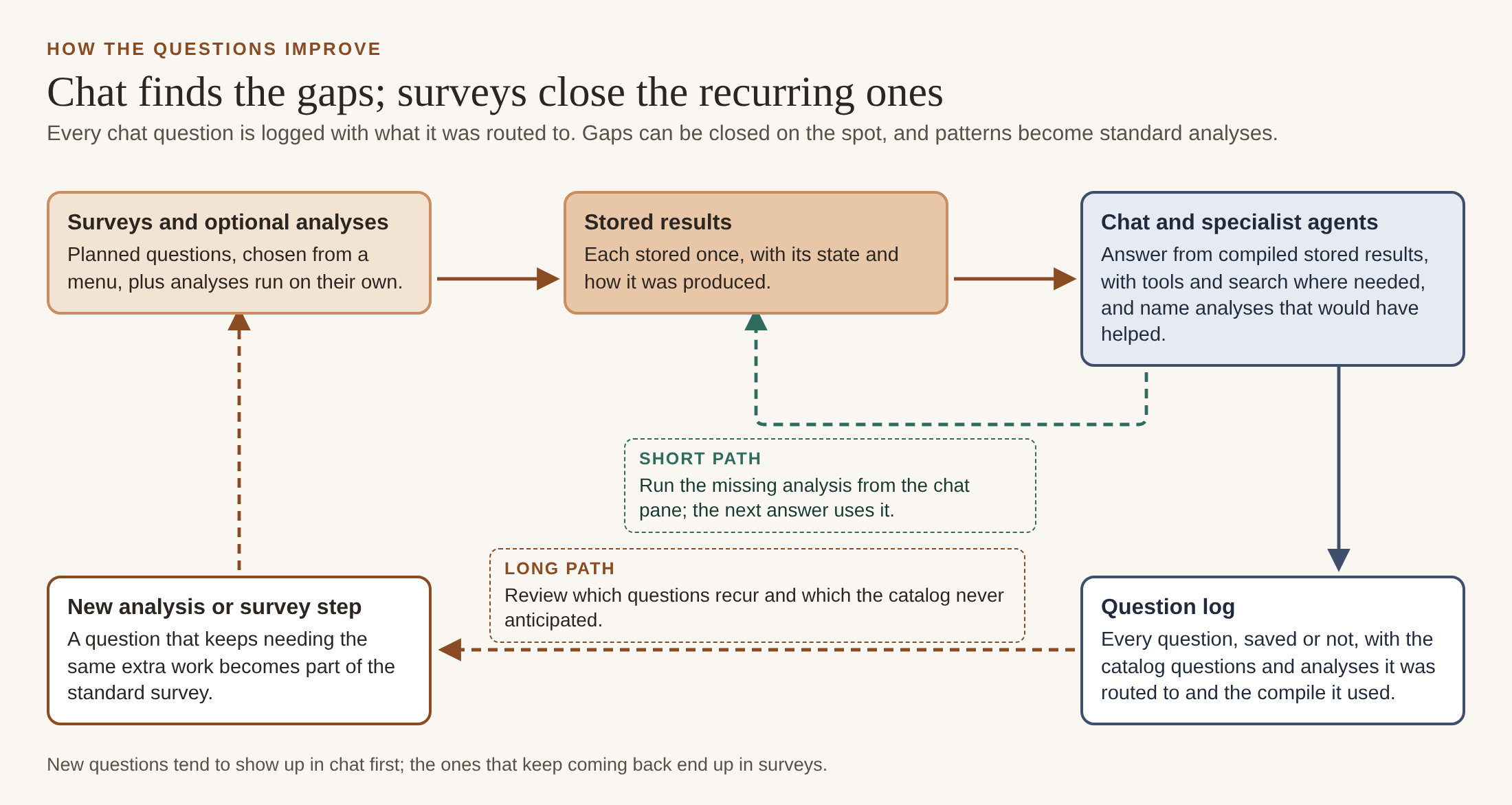
Not every analysis is part of a survey. You can run one on its own as an optional step, and when chat finds that an analysis would have answered your question but has no result, it offers to run it. Either way the result is stored the same way a survey result is, and the next answer can use it.
Chat answers the questions that weren’t planned for. Some are follow-ups: a survey reports 32 dependencies, and you want to know which changed since the last ingest. Some ask what a result means for you. Some span resources: which repositories have no license classification, or which ones appear to use this database. No survey definition will anticipate all of these, and you shouldn’t have to write one to ask a question.
Chat is not one model answering on its own. A conversation agent handles the exchange and hands questions to specialist agents when they need particular skills: a compare agent for side-by-side questions, including differences between database schemas; an integration agent for how two resources connect, using declared dependencies, stored links between repositories and databases, and a compile across both; and an examples agent for code examples. These are not analysis steps. What they produce is an answer rather than a stored analytical result, at least for now. Each reads the stored results and combines techniques to answer: queries over those results, compiled context, search over documentation where that helps, and a model to bring it together. Their answers can be kept in the investigation journal like any other chat answer. The same specialists are available to other agents as well as to people.
So chat doesn’t replace surveys; it depends on them. Without measured evidence underneath, it falls back to searching documents and guessing, and we show below roughly what that costs.
Context Compilation
What we want is repeatable answers that people can trust, with as little guessing as possible. Most of that work happens in context compilation. Before the model sees your question, Resource Explorer assembles the evidence it is allowed to use, within a fixed budget, and records exactly what it assembled. Our rule is to make everything deterministic that can be, and to use the model only for the part that actually needs one.
Context compilation is the context engineering half of our approach: assembling, ranking and packing evidence to fit a budget. The other half is context intelligence, and the two work together. Egeria is the source of truth for the questions, perspectives and purposes the compile ranks by; Resource Explorer keeps a local copy so it can work over them quickly. Egeria also holds what is already known: the projects and organizations involved, and the existing resources a new one can be compared against, which some of our catalog questions ask about directly. An investigation pulls that context together for a particular purpose. The compile then uses the intent of your question, your chosen perspectives and purpose, and the catalog’s mapping from questions to analyses, so it pulls in what bears on the question rather than everything it has.
That split matters beyond Resource Explorer. The compile is tuned for Resource Explorer today, and we plan to extend it across Trellis, but the context intelligence Egeria provides is there for any application to use.
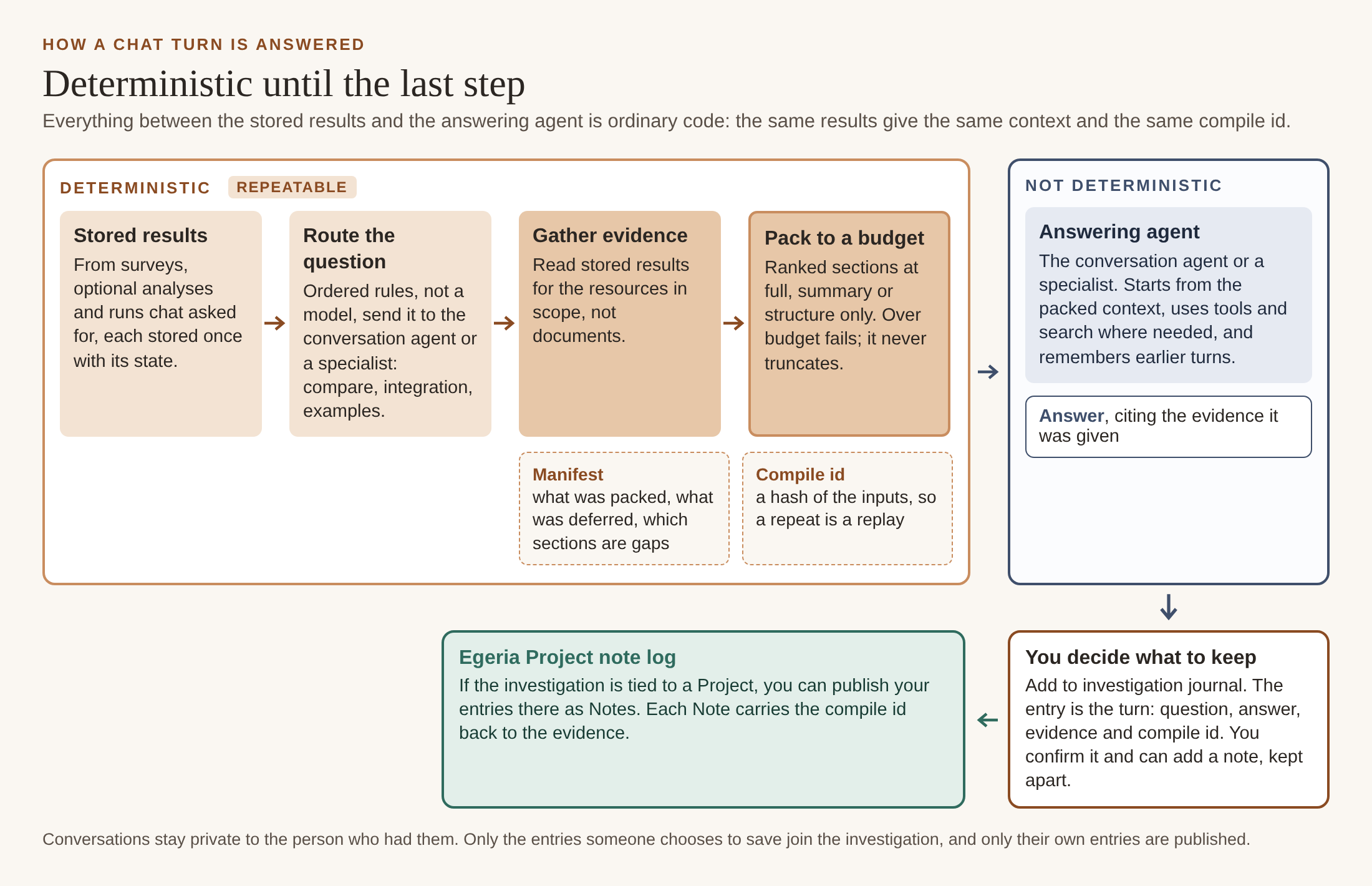
A chat turn breaks down like this.
- Stored results come from surveys, optional analyses and runs that chat asked for. However a result was produced, by code or by a model, it is stored once, with its state, and every compile after that reads the same stored result.
- Classifying the question (a comparison, a dependency question, a coverage question?) uses ordered rules, not a model. The same question is always routed the same way.
- Gathering evidence is mostly reading stored results for the resources in scope, not retrieval over documents.
- Packing the context is ordinary code, by design. The same inputs produce byte-identical context. Raising the budget never removes content. Going over the budget is a hard failure, not a silent truncation. Each compile gets an id derived from its inputs, so we can tell when a compile is a repeat of an earlier one.
- The manifest records what was packed, at what level of detail, what was deferred for budget, and which sections had no evidence at all. A missing section is named as a gap rather than quietly left out.
- Answering is where the model comes in, and this part is not deterministic. The model reads the packed context, may call tools to look further, and remembers earlier turns of the conversation.
The answering step is also what makes chat useful. You can ask a follow-up without restating anything, and the answer can draw on more than a result card shows: the full dependency list rather than its count, or the reason an analysis couldn’t run. Survey results tell you what was measured; chat lets you ask what that means for you.
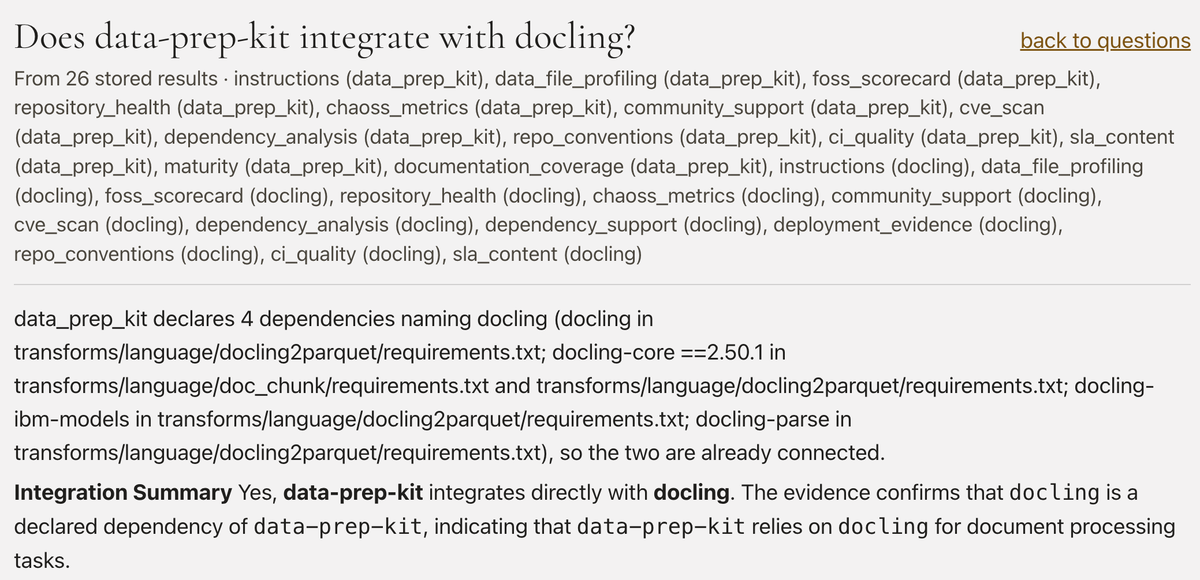
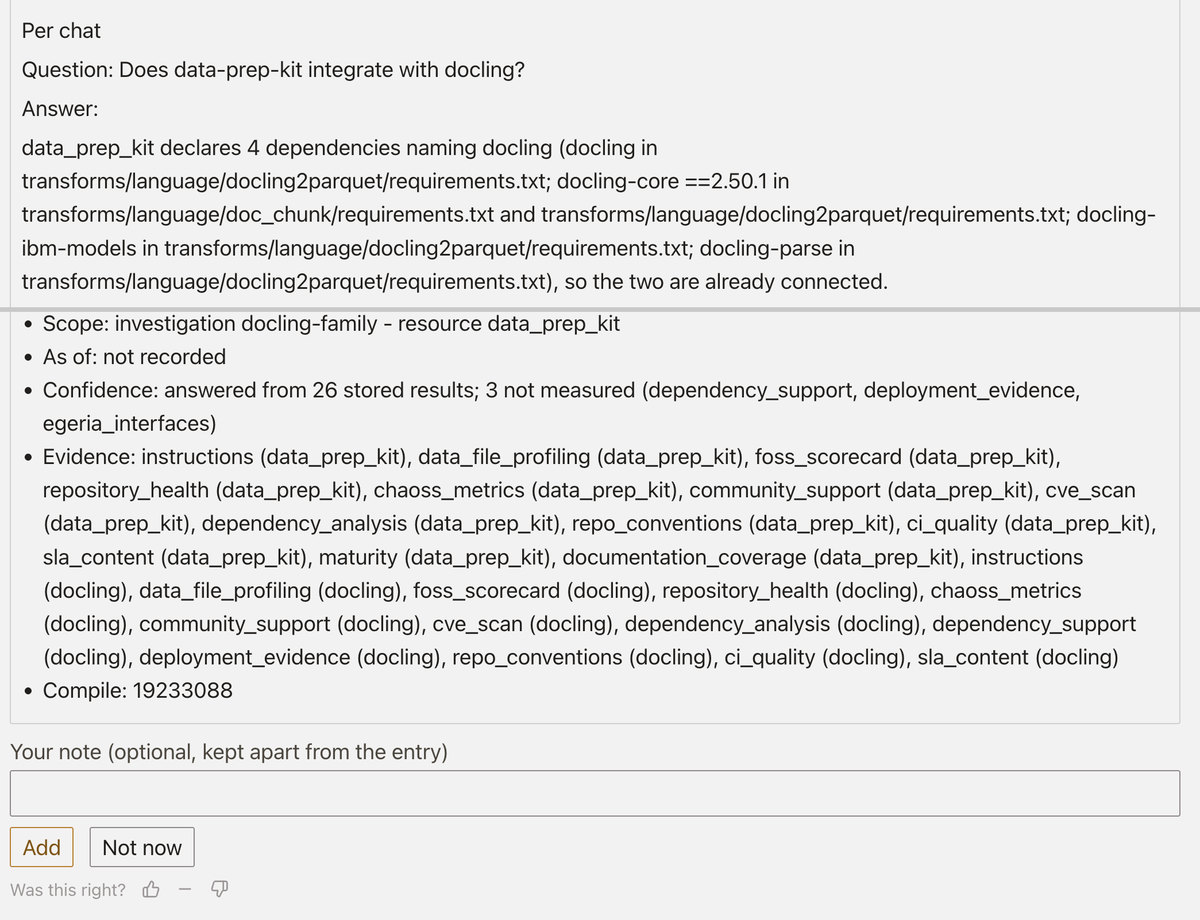
Here is an example from one of our investigations. Data-Prep-Kit and Docling are two Linux Foundation AI & Data projects. We surveyed their GitHub repos and asked via chat whether data-prep-kit integrates with docling. Above the answer is the list of the 26 stored results it was compiled from. The answer starts with the stored facts from these surveys, four declared dependencies and the files that declare them, and then the model adds its own summary.
Below the answer, Resource Explorer lists what it could not use. Three analyses that might have helped had no stored result. The panel shows that no run is recorded for each one, with buttons to run or schedule it.
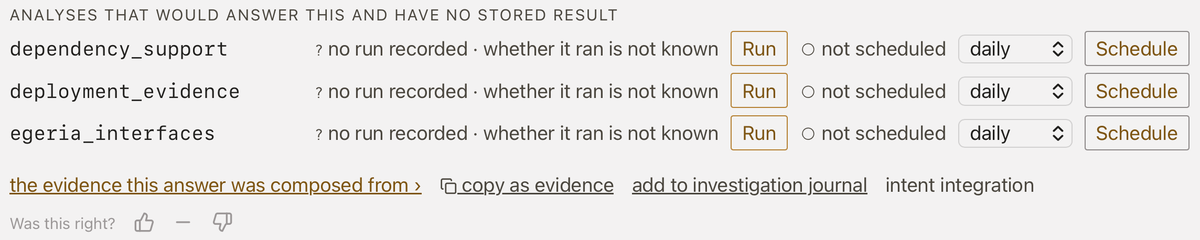
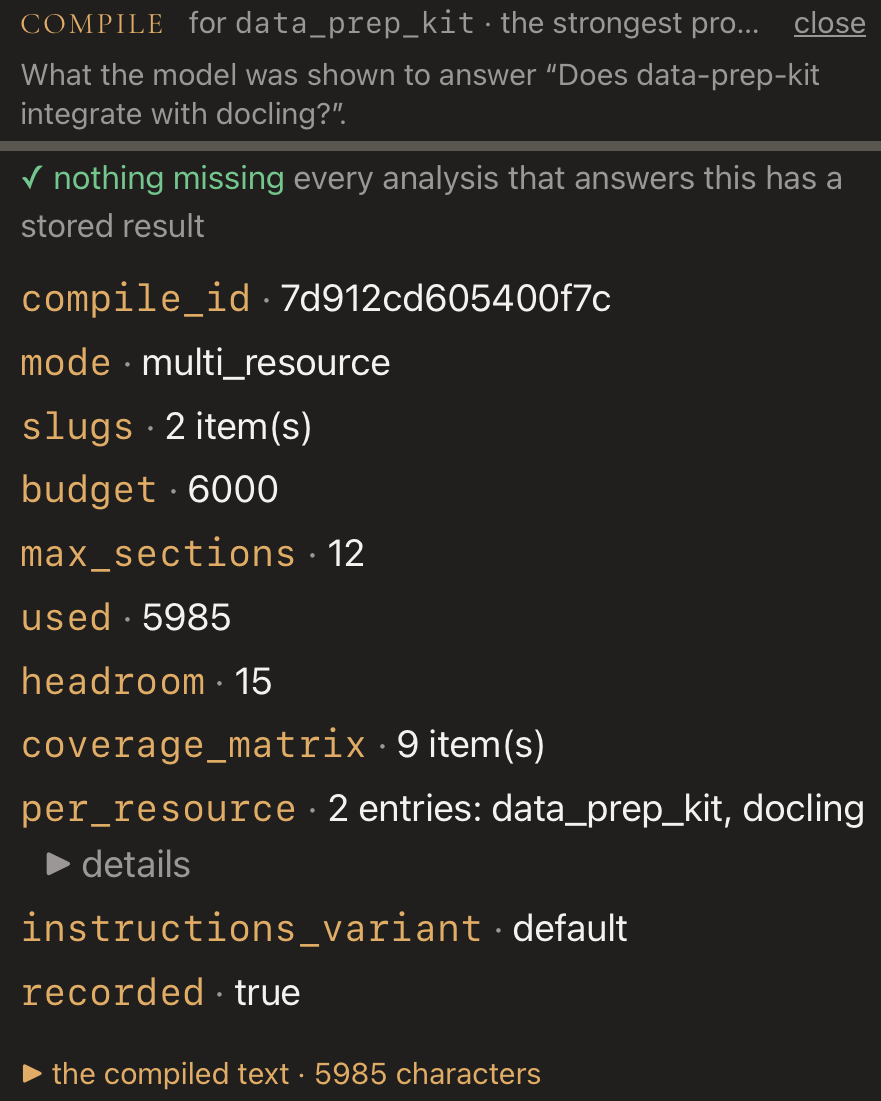
So we ran them. The next compile reported nothing missing: every analysis the catalog maps to this question now had a stored result. The answer hardly changed. The extra runs didn’t change the conclusion; they confirmed it, so we know the answer wasn’t missing anything instead of assuming it. Running a missing analysis sometimes changes the answer and sometimes just increases your confidence in it, and the compile record shows which happened. That is the general idea: we try to help you gather a complete set of evidence, and when we think something might be missing, we tell you, rather than letting an answer imply it is complete.
Budgets: What, Why and How
Every compile works within a budget, and how we set and enforce it has a big effect on how repeatable the answers are.
What we budget. Two limits, one inside the other. The outer one is the model’s context window: everything the model can hold at once, including our instructions, the evidence, the conversation so far and the answer it writes. The inner one is the evidence budget: how much stored evidence goes in front of the model for a single question. As we run it today, the window is 32,768 tokens on a development machine and 8,192 on our demo machines, which run an 8B model, and answers are capped at 4,096 tokens. Inside that, chat gets 6,000 characters of evidence, with at most 12 sections competing for it.
How a compile fills it. Each analysis the question points at that has a stored result becomes a candidate section, ranked by how directly the question and your chosen perspectives point at it. The packer takes sections in rank order at full detail, steps a section down to a summary or structure only rather than cutting it off, and stops at the section cap or the budget. The rest are recorded in the manifest as deferred, analyses with no stored result as gaps, and if even the required parts won’t fit, the compile fails rather than truncating.
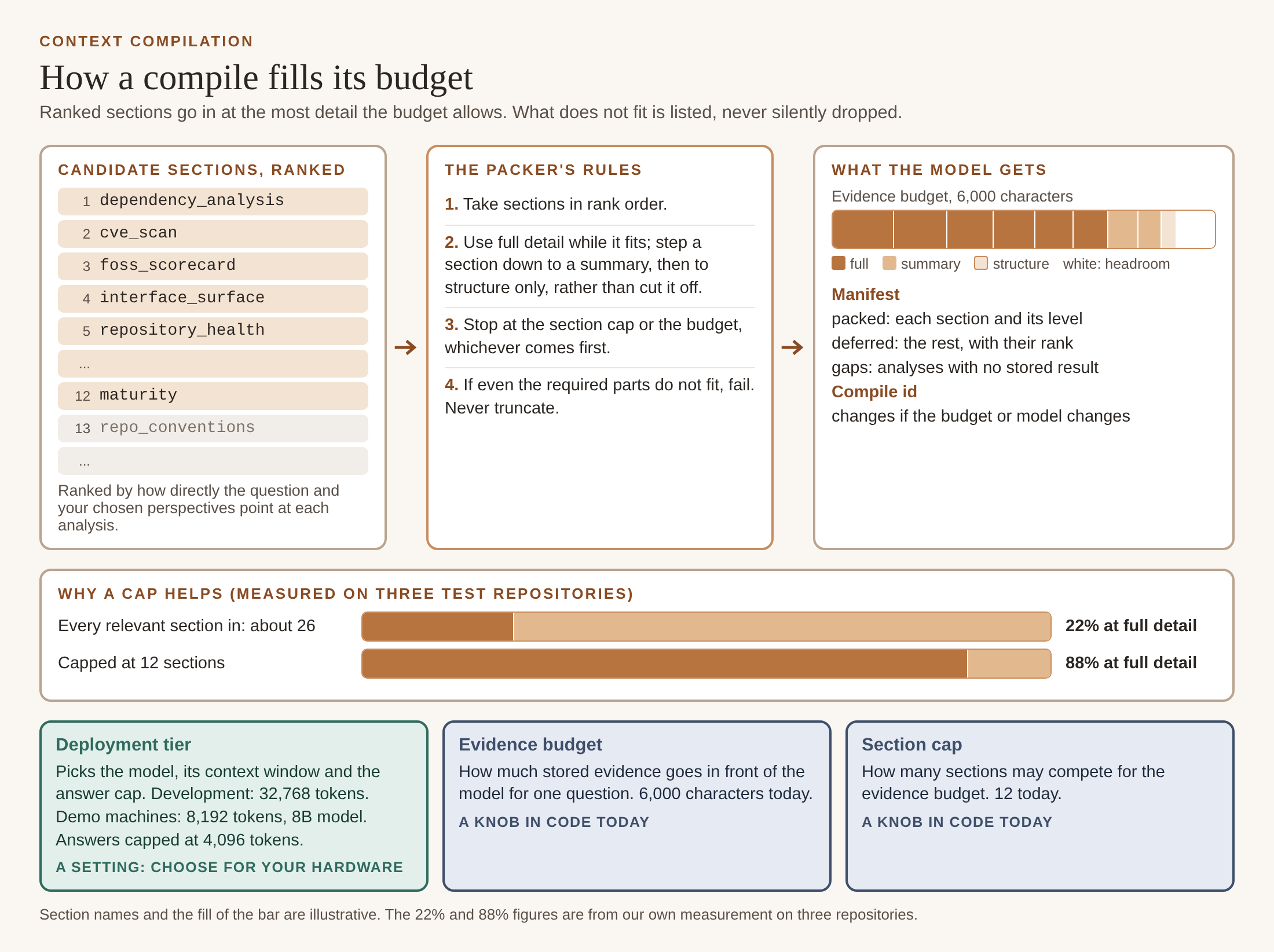
Why smaller is often better. Part of the reason is practical: smaller contexts answer faster, cost less, and fit the modest hardware many people will try Resource Explorer on. The bigger reason is trust. More context does not mean a better answer. Before we capped the number of sections, about 26 of them shared the 6,000 characters, and four in five could only go in as summaries: a line saying an architecture summary exists, rather than the architecture itself. The model then treated those summaries as if they were the answer. With the cap at 12 there are fewer sections, each with room for real content, and the share packed at full detail rose from 22% to 88% on our test repositories.
Tuning it to your setup. These values are defaults, not fixed limits. The deployment tier sets the model, its context window and the answer cap, so you can match them to your hardware or choose a model directly; as the comparison below shows, the model matters as much as the evidence. The evidence budget and section cap are set in code today, and moving them into settings is on our list. Since the budget and model are inputs to the compile id, you can compare answers before and after a change against the same stored results. And check that your runtime enforces the budget: one of our model back ends was quietly loading a 2,048-token tier at 32,768.
Each compile can be opened afterwards. Here is the compile behind the second answer, after the missing analyses had run.
What the Numbers Say
We wanted some evidence that compiled context is worth the effort, so we ran a rough engineering check, not a rigorous study: three repositories, 52 questions from our catalog, the same agent and model, with and without compiled evidence. A second model scored the 312 answers against a rubric we revised more than once as we found problems with the scoring itself.
With those caveats, the direction was clear, and not all of it in our favor.
- Compiled answers cited their evidence 36% of the time; retrieval-only answers, 1%.
- On questions a specific analysis is meant to answer, retrieval-only answers claimed a result for an analysis that had none 16% of the time; compiled answers, 4%. Preventing that kind of error is the main reason we built the compiler.
- Compiled answers also made more unsupported claims (0.82 per answer against 0.58), which is what led to the section cap described above.
Because the packer is deterministic, we could also hold the evidence fixed and change only the model. On identical evidence, a 32B model answered noticeably better than an 8B one, and was more willing to state its coverage plainly: “could not query 61 of the 61 declared dependencies.”
From a Chat Answer to the Investigation
That leaves the question of where a good answer goes. In Part 1 we described investigations: the scope a survey run lives in. An investigation can be bound to an existing Egeria Project, create a new one from the start, or stay local to Resource Explorer and be promoted later. When it is tied to a Project, results and evidence are shared with its members. Survey results belong to the investigation. Chat, by design, does not: your conversation is private to you, while the evidence underneath it is shared.
We don’t capture conversations automatically. Most turns are exploratory, some are wrong, and a few are worth keeping; deciding which is up to the person asking.
With an investigation open, each chat answer has an add to investigation journal link. The journal entry is built from the chat turn: your question as you typed it, the answer as it was shown, and a short provenance section listing the stored results it drew on, the scope, how current those results were, the confidence they support, and the compile it came from. You can’t edit any of that. You add the decision to keep it and, optionally, your own note, which is stored alongside the entry rather than in it, so nobody can tidy up an answer after the fact and readers can tell what the model said from what a person thought. You can also ask the chat to add the last answer; it asks you to confirm, then writes the same entry.
If the investigation is tied to a Project, you can publish your own entries to it, where they become Notes in the Project’s note log, still carrying the compile id. Someone on the project can follow a Note back to what the model saw when it wrote the answer.
We also keep a record of every chat question, whether or not it is saved: the question, the catalog questions and analyses it was routed to, and the compile it used. Over time this shows us which questions people actually ask, which ones the catalog answers well, and which ones it doesn’t cover. Some gaps can be closed straight away, when someone runs the missing analysis from the chat pane and the next answer uses it. Questions that keep needing the same extra analysis are candidates for a survey step of their own. In practice, new questions tend to show up in chat first, and the ones that keep coming back end up in surveys.
Where We Can Improve
None of this works without watching it. A system that mixes deterministic steps with a model needs observability so we can monitor it and keep tuning it. We trace every agent run with Arize Phoenix, which shows each tool call the model made or skipped, and we log experiments, token usage and query metrics to MLflow. We found every problem below that way.
- Models skip tools. Asked what a repository depends on, one model made no tool call and listed three packages from memory, while we had 32 stored. We fixed it, as with most of our recent chat fixes, by putting the stored evidence into the compiled context for that kind of question rather than by changing the prompt.
- Our routing rules miss phrasings. Routing by rules is what keeps it repeatable, but rules only catch what they were written for. “Is there a relationship between data-prep-kit and docling-core?” matched none of our patterns, so it was answered as a general question instead of going to the agent that looks at how resources connect. Each miss we find becomes a new pattern and a test case.
- Coarse summaries still produce invented specifics. The section cap reduced the problem, but it is still the main open issue in the compiler.
- Chat is not scoped to an investigation. An answer joins one only when someone saves it. That is deliberate, but the investigation’s record of what was asked is only as complete as people choose to make it.
Looking Ahead to Part 5
Everything in this post assumes the questions, analyses and surveys we ship. In practice the useful ones will be yours: the question your team keeps asking, the check your domain needs, the source we never thought of. In Part 5 we look at making Resource Explorer your own: how you add questions, analyses, surveys and sources, how a new analysis can describe its own results so they show up in Understanding, compile into chat and publish to Egeria without anyone changing our code, and how each result carries the way it was produced and the confidence behind it: measured, inferred by rules or a model, or judged by a person.
Links
- Try it. The demo is open to anyone at egeria.pdr-associates.com: register free, no install, and it comes pre-loaded with a complete Egeria environment built around the fictional Coco Pharmaceuticals. It assumes a somewhat technical reader. If you would rather point it at your own estate, Resource Explorer runs from a fresh clone with Postgres and Ollama; you only need an Egeria server when you want to publish what you found.
- Or watch it. Egeria up and running in under two minutes, and accessing the demo environment. A fuller tour of what is in there is in the Egeria Workspaces 6.1 write-up.
- Egeria: the project itself, with the code at odpi/egeria.
- odpi/egeria-trellis: the monorepo where Resource Explorer lives.
- odpi/egeria-python: pyegeria.
- The context compilation design: context-compilation-design.md in egeria-trellis.
- The compiled-versus-retrieval comparison, the source of the numbers in this post: compiled-vs-rag.md in egeria-trellis.
- Arize Phoenix and MLflow, the two observability tools we use.
- The rest of this series: Part 1, Effective Exploration and the Survey Funnel, Part 2, The Anatomy of a Question, and Part 3, Asking a Question.
- Earlier writing: The Egeria Advisor, Sharing the Journey and Literate Governance and the Collaborative Canvas. Both predate Resource Explorer, so some details have moved on, but the ideas hold.
As always, feedback is welcome, and if one of these questions matters more to you than it does to us, the analysis behind it is open source and yours to improve.