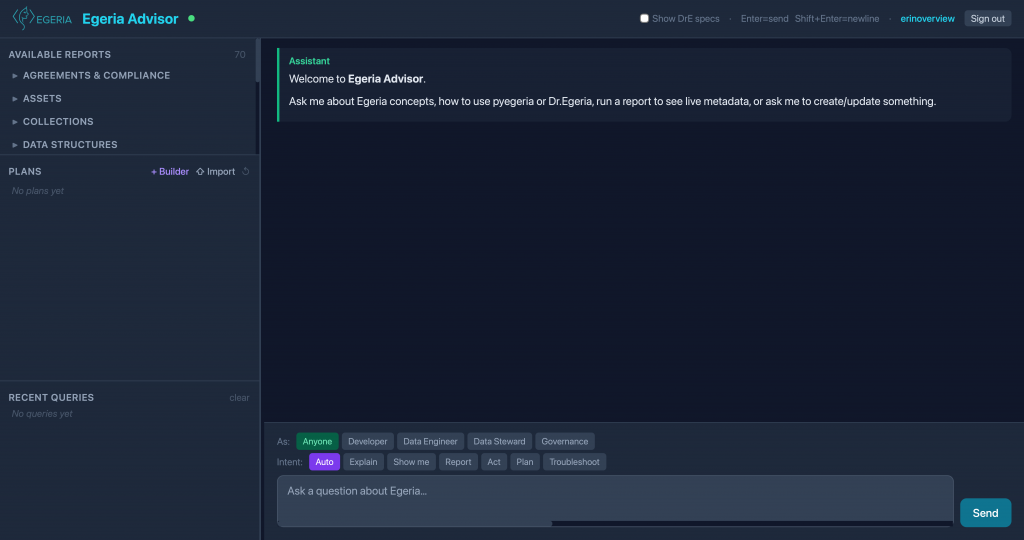
In my last post, I detailed how we addressed the challenge of non-determinism by moving to a coordinated multi-agent architecture and introducing explicit Intent and Perspective controls into the front-end Web UI. By wrapping our local LLMs inside a deterministic framework, we pushed our core routing classification accuracy to the point where it produces predictable and acceptable results.
But an advisor can’t just be an isolated, one-way reference engine. To become a trusted part of the community’s daily workflow, it needs to learn from its users, provide immediately actionable code and template discovery, and actively connect to a live data estate.
This phase of the Egeria Advisor’s evolution was driven by three balanced priorities: establishing meaningful feedback and use-case improvements, connecting user perspectives to real-time reporting, and taking our first major steps into active command execution.
1/3: Learning and Improving via Feedback, Examples, and Templates
An architecture is only as good as its ability to adapt to real-world usage. To transition the Advisor from a closed experiment into an evolving tool, we introduced a structured, closed-loop feedback mechanism directly into the Web UI—capturing simple “thumbs up” and “thumbs down” signals alongside detailed backend query metrics. This feedback didn’t just sit in a log file; it actively drives our admin dashboard analytics, helping me to determine where and what kinds of improvements were needed. Needless to say, this is an ongoing thread of work to constantly improve metrics, analysis, and responses.
Concurrently, we focused heavily on upgrading our dedicated ExamplesAgent. We realized that data engineers and developers don’t just want text descriptions; they need functional, contextually accurate code. We enhanced both the routing and generation of code examples, introducing a specialized “method-discovery mode” that acts as an intelligent API reference engine.
Alongside live code generation, we recognized that users frequently need structural blueprints to jumpstart their work. This led to the introduction of the egeria_templates collection—a specialized vector index containing pre-configured Dr.Egeria markdown templates. We deliberately tuned this collection differently from our standard documentation indexes:
- Chunk Size: 2048 tokens—ensuring an entire template file is captured completely in a single chunk rather than being fragmented.
- Overlap: 0 tokens—since each template file is self-contained.
- Priority: Set to the highest priority in the system, ensuring that if a user asks for a template, the system immediately uncovers the exact file blueprint they need.
2/3: Guided Reporting: Running the Right Report Spec via Context Intelligence
Answering static questions is a passive exercise. But we could do so much more! We could allow all users to create, update, view, and report on the treasure trove of information that we manage in Egeria. Dr.Egeria enables anyone with a text editor to specify new Governance Definitions, Create Glossary Terms, Define Solution Blueprints, and much, much more! Dr.Egeria has more than 150 commands (with more to come). Commands are implemented in a markdown variant and so can be entered using any text editor—or, as we will discuss in the next section, defined interactively using the Egeria Advisor.
To truly serve roles like Data Stewards and Governance Officers, the Advisor needed a mechanism to interact with Egeria easily, with no programming. This imperative led to our integration with the Model Context Protocol (MCP), allowing us to expose secure, live operational tools directly to our agent framework.
The first major application of this protocol was building out our semantic report pipeline. Egeria features a deep, powerful library of more than 200 pre-defined “Report Specs,” each designed to inspect specific facets of an organization’s metadata estate. Trying to force an LLM to blindly guess which report specification to use would destroy the repeatable consistency we fought so hard to build in the previous phase.
This is where Context Intelligence helps. We augmented the representation of report_specs to allow us to specify, for each kind of report, typical user perspectives that would be interested in that report and the kinds of questions that they might ask. We could then use this additional context to help users find and select reports that might help them address the questions they had. So now, we can use the Perspective and Intent context provided by the UI and the user’s prompt to offer reports that might be suitable, allow them to select the one they are interested in, and then execute it, returning the results in the output format they requested.
Now, when a Data Steward asks, “What reports can I run to see Data Licenses?” the system executes a multi-step semantic pipeline:
- The coordination engine checks the active Perspective signal from the UI.
- It runs a fast semantic search over our
QuestionSpecIndexto locate the exact report specification matching that viewpoint and inquiry. - The engine invokes the live
run_reportMCP endpoint, executes it directly against the active Egeria instance, and formats the real-time outcome context into structured lists or readable Markdown data.
3/3: Active Governance: Create, Relate and Update Egeria via Dr. Egeria
Pulling live reports gave the Advisor sight; the final third of this phase was about giving it hands. Explaining how to build a data structure or showing a template is a massive help, but a true collaborator should be able to actively assist in executing the task.
We expanded our Dr.Egeria MCP server integration by introducing the dr_egeria_run_block tool. This connected the Advisor to a dedicated DrEgeriaActionAgent, an agent designed to compose and execute multi-field Dr.Egeria commands directly from a conversational prompt.
Instead of forcing users to manually copy-paste configuration commands into separate terminal scripts, the Advisor can now take a structured command script, parse its fields, and push it directly through the MCP gateway to be validated and executed against the live platform.
This early foray into active environment modification changes the dynamics of the user interface. Users can now not just query and view information defined by Report Specs, but they can now create and update the information that Egeria manages. They add their own comments to Information Supply Chains or Define new Projects. Create and use external citations or design Solution Blueprints—all through simple Dr.Egeria markdown files. This initial implementation provided a template as a starting point, allowing a user to specify the Dr.Egeria text, but it wasn’t truly collaborative. This gave rise to a whole new set of experiments into what I call Literate Governance.
The Next Step: Literate Governance with Context Intelligence
By combining a closed loop of human feedback, real-time semantic report spec generation, and active Dr.Egeria tool execution, the Advisor had outgrown its identity as a passive reference tool. It had become an active bridge to the live environment.
But as we began utilizing the system to execute these live blocks, a new complexity emerged. Real-world data management tasks are rarely simple, isolated, one-off commands. They are multi-step workflows: defining a project, assigning team members, mapping out glossaries, and validating compliance rules in a rigid, mandatory sequence.
In our next blog installment, we will dedicate the entire discussion to our latest experiment: Literate Governance with Context Intelligence. We will look at how we built a collaborative planning engine that lets users describe complex metadata chores in plain language, generates interactive command canvases side-by-side with the chat, and delivers outcome reports with built-in provenance.
As always, feedback is welcome!